Measurement and Evaluation Capabilities for Agentic Engineering
Overview
Previously, I wrote about how to measure how productive an agent can be when paired with an engineer. It primarily covered the method of measurement and some abstractions that can be made from it. Today, we will cover how to actually apply this in practice in your operational setting.
The main takeaway behind last week's write-up was to associate an agentic effort with a feature set to allow for measurement. Binding agentic effort to a ticket (or any label) allows classification via labeling for reporting on areas such as spike, planning, implementation, security-review, rework, and so on.
Furthering this initiative I have developed a small CLI that wraps existing agentic coding tools such as Codex, Claude, and OpenCode that captures telemetry around a session. The tool is called svdo-meter, a thin telemetry harness for agentic coding CLI sessions. Practically I do not see this as a replacement of existing tools, but as a model for tooling to follow that demonstrates how to map execution to various ways of work classification.
Running the CLI
Below is an example plan operation that you can run on the CLI. The CLI documentation has a full set of commands that you can run for svdo-meter, however in the example below, we define the baseline set of commands that can be useful when attempting to run and classify work being done.
Command
svdo-meter run \
  --ticket ENG-142 \
  --label "plan" \
  --harness codex \
  --workspace ~/code/app \
  --prompt-file eng-142.md
Extracting Telemetry Data
Once your operation is completed, go ahead inspect your output. You can export json, pipe out into other systems, read it directly in terminal, or output other formats. More details are provided in the repository.
svdo-meter report ENG-142 --format jsonOutput
{
  "groups": [
    {
      "work": "ENG-142",
      "harnesses": [
        "codex"
      ],
      "sessions": [
        "01a02457-e214-7961-8510-08c2e0784a47"
      ],
      "runs": 3,
      "agent_time_ms": 44681,
      "tokens": {
        "input": 160139,
        "output": 1009,
        "cache": 123648,
        "total": 284796
      },
      "records": 10
    }
  ],
  "diagnostics": []
}
Use Cases
Now that we understand the basics of our telemetry tooling, we can build more elaborate experiments to assess our engineering performance and repository alignment within our organization. Using svdo-meter, we ca measure segments of execution, we define our criteria in yaml files to enforce outputs of generated code, alignment criteria checked against repository instructions, or specific tool call checks in the generation events that get created.
Measurement
Using svdo-meter run as defined previously, we can derive meaningful insights where effort and time is spent, ultimately providing us with potentially novel granularity for our agent processes during engineering work.
SVDO Label Group Report - LABEL-TODO-DUEDATES
Workspace: /tmp/svdo-label-grouped-reporting.ZJ4Ia1

Label       Runs  Agent time  Input tokens  Output tokens        Spend
----------  ----  ----------  ------------  -------------  -----------
plan           1  5m 35s             14200           2100      $0.0387
implement      1  13m 50s            38600           7600      $0.1242
----------  ----  ----------  ------------  -------------  -----------
total          2  19m 25s            52800           9700      $0.1630
Full example: https://github.com/brianofrokk3r/svdo-meter/tree/main/examples/label-grouped-reporting
Alignment Checks
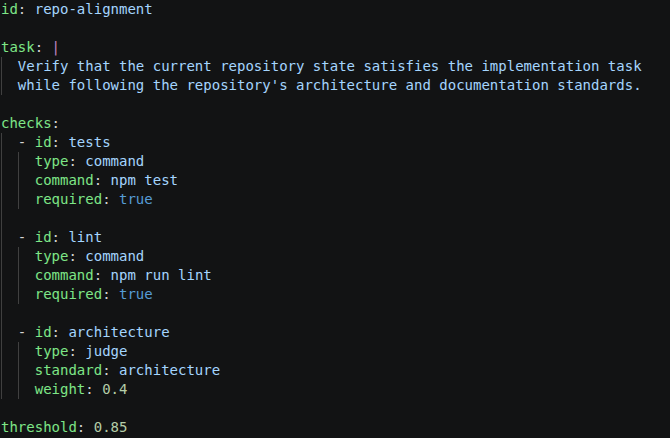
Alignment tells us that our agents are following our instructions, and the outputs that we plan are the outputs that we have received. To do an alignment check, we can check several deterministic commands, tool calls, and run evaluation judges.
In our example evaluation, we have defined the following specification below. It checks for files, and applies a judge to validate that the repository metadata matches our required states.
Validate Repository Standards
id: repository-standards
task: |
  Check that repository guidance and tracked alignment standards remain available.
checks:
  - id: agents-file
    type: command
    command: test -f AGENTS.md
    required: true
    weight: 0.25
  - id: repository-alignment-standard
    type: command
    command: test -f .svdo/standards/repository-alignment.md
    required: true
    weight: 0.25
  - id: alignment-standard
    type: judge
    standard: repository-alignment
    weight: 0.5
threshold: 0.5
When running svdo-meter eval ..., it correctly identifies that the agent documents are out of specification, stating that AGENTS.md has failed a check:
repository-standards  score 0.68 / threshold 0.50  PASS
  Duration: 25034ms
  Failed checks: alignment-standard
  - agents-file [command] passed score 1.00 required
  - repository-alignment-standard [command] passed score 1.00 required
  - alignment-standard [judge] failed score 0.35
  Failure Report:
    alignment-standard [judge] score 0.35 exit 0
      - AGENTS.md now instructs agents to read .joule/standards.md and .joule/standards/, but those files are not present in the repository, so the referenced repository guidance is unavailable.
      - The tracked SVDO standards under .svdo/standards/ remain present, including repository-alignment.md, but AGENTS.md no longer references them, breaking the expected root instruction path.
Prompting Improvements
Assessing how optimized your prompts are and how they impact your code generation can be a challenge. In this example, we demonstrate how to leverage svdo-meter to assess how varying implementation of stop-words impacts output generation, while still achieving the evaluation requirements.
  SVDO Stopword Study Report - STOPWORD-TODO-20260915-003931
  ================================================
  Metric: output_tokens
  Ticket match: exact work id or per-run ticket id prefixed by work id
  Grouping: run label prefix before trailing numeric repetition
  Significance: Welch-style 95% confidence heuristic; local environment.

  Variant                    Min / p50 / max       Mean output    Std dev
  -------------------------  --------------------  ------------   -------
  concise-baseline           1602 / 2634.0 / 5384  2758.9         856.0
  polite-redundant-stopword  1761 / 3410.0 / 4454  3222.3         708.4
  stopword-heavy-guided      1609 / 3159.0 / 4875  3033.9         852.9
  telegraphic-low-stopword   1612 / 2254.5 / 3450  2354.8         540.2
Full example: https://github.com/brianofrokk3r/svdo-meter/tree/dev/examples/todo-cli
With 30 runs per variant it is statistically suggestive that more a concise prompt leads to a more concise outputs, while still achieving the evaluation requirements. This isn't a groundbreaking finding, however it is relatively simple to implement now in a pipeline that evaluates skills and agents.
Where this becomes useful
Telemetry is really the first step. The more interesting part is really what becomes possible when we associate agentic work with tasks, types of work, and measurable outcomes.
The goal is to change agentic engineering from intuition into experimentation. We are at a point where we can run the task against different models, prompts, tools, and planning to achieve similar outcomes.
If you're interested in this initiative, follow my project on Github or reach out on LinkedIn to chat.
 brianofrokk3r